How to Sell a Used Laptop in Israel: Prep, Price, and Where
Shukshuk team · Updated October 2026
An old laptop in a drawer loses value every month. This guide does three things: cleans the laptop so none of your accounts is left on it, compares trade-in with a private sale using the only figures that could be verified today, and gives a pricing method. The bottom line first: for a Windows laptop, the published credit is ₪414 to ₪453 by year alone, whatever the spec, so a private sale almost always pays more. For a MacBook the picture is more mixed.
Laptop trade-in: "estimated refund" published by iDigital, as of 2.10.2026
- Estimated refund
- ₪414
- Note
- By year, not by spec
- Estimated refund
- ₪453
- Note
- Other makers 2021 and later: also ₪453
- Estimated refund
- ₪1,127
- Note
- "Good +" condition only
- Estimated refund
- ₪1,550
- Note
- Final valuation in-store
- Estimated refund
- ₪2,492
- Note
- Credit only towards a new Mac
- Estimated refund
- Usually above the credit
- Note
- No price list: see the method below
| Computer | Estimated refund | Note |
|---|---|---|
| Dell, HP or Lenovo PC, 2017 and earlier | ₪414 | By year, not by spec |
| Dell, HP or Lenovo PC, 2018 to 2020 | ₪453 | Other makers 2021 and later: also ₪453 |
| MacBook Air 13 M2, 16GB, 512GB | ₪1,127 | "Good +" condition only |
| MacBook Air 13 M3, 16GB, 256GB | ₪1,550 | Final valuation in-store |
| MacBook Pro 14 M3 Pro, 18GB, 1TB | ₪2,492 | Credit only towards a new Mac |
| Private sale | Usually above the credit | No price list: see the method below |
The amounts are examples the chain itself calls an "estimated refund", for a computer with no scratches, breaks or cracks and in full working order. The refund is given only as credit on a new Mac, at the time of purchase or up to 30 days after it. Other chains were not checked today.
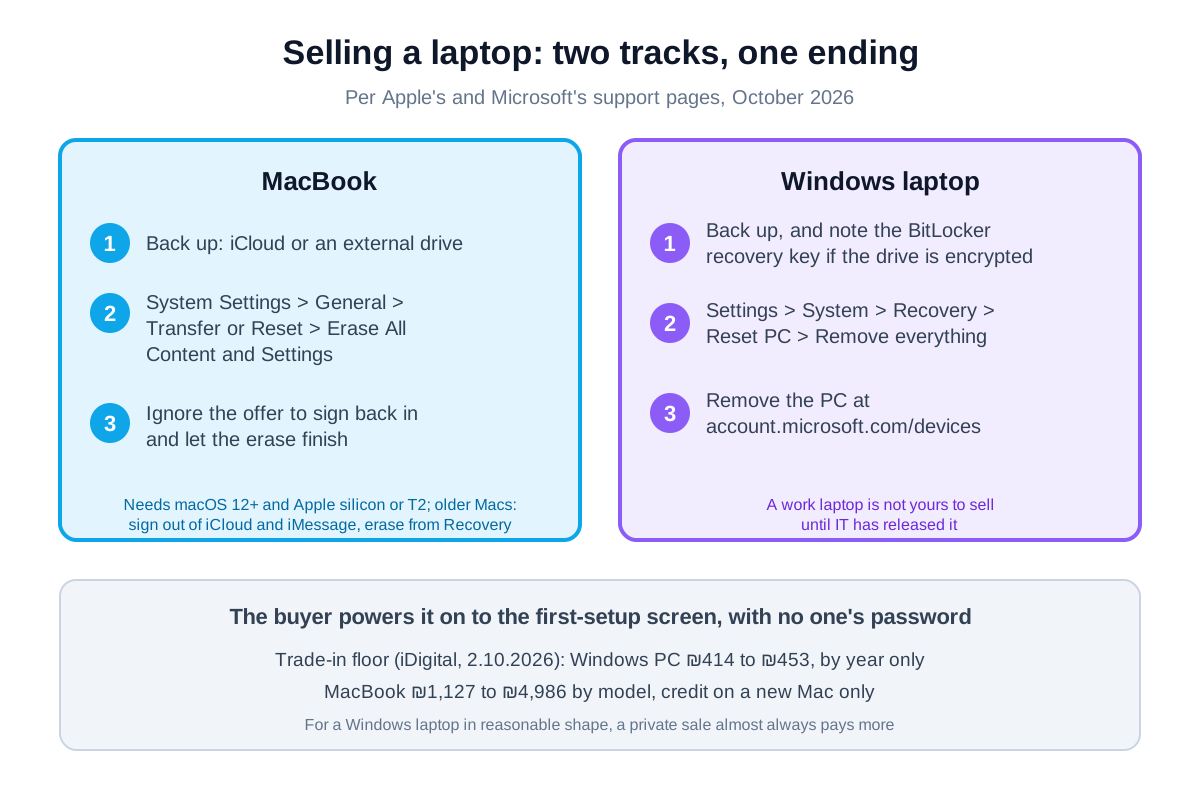
First: back up and leave every account
A laptop sold with the previous owner's account still on it is a laptop the buyer brings back. Before anything: a backup. On a MacBook to iCloud or an external drive, on Windows through Windows Backup or to a drive. After the erase there is no way back. MacBook. Per Apple, the simple route is Erase All Content and Settings: System Settings > General > Transfer or Reset > Erase All Content and Settings. It is available on macOS Monterey 12 or later, on a Mac with Apple silicon (M1 onwards) or with the T2 Security Chip, and Apple says that if you can use it you do not need any of the other steps. The assistant asks for the Mac's password and your Apple Account password, and signs you out of Apple services. If a message offers to sign you back in, Apple says to ignore it. An older MacBook without that option: sign out of iCloud (System Settings, your name in the sidebar, Sign Out), sign out of iMessage (Messages > Settings > iMessage > Sign Out), unpair Bluetooth accessories that carry your name, then erase and reinstall macOS from macOS Recovery with Disk Utility. On an Intel Mac Apple also says to reset NVRAM. Windows. Per Microsoft: Settings > System > Recovery > Reset PC, and there Remove everything. If the drive is encrypted with BitLocker, Microsoft says to make sure you have the recovery key before the reset. Then, from any other device: account.microsoft.com/devices, find the PC and remove it from your account. A work laptop? It is not yours to sell until the IT department has released it.
Trade-in versus private sale
The table above is everything that could be verified today, from iDigital's trade-in page. Two things stand out. First: for a PC, the refund is set by year alone. ₪414 for a Dell, HP or Lenovo from 2017 or earlier, ₪453 for 2018 to 2020, and ₪453 for other makers from 2021 on. A 2022 gaming laptop and a basic office laptop of the same year get the same amount. So for any Windows laptop in reasonable shape, a private sale almost always pays more, and the credit is mainly a floor. Second: for a MacBook the refund does depend on the model, from ₪1,127 for a MacBook Air 13 M2 up to ₪4,986 for a MacBook Pro 16 M4 Max, and here trade-in can be a reasonable choice for someone buying a new Mac anyway. Three conditions in the small print: the credit is only towards a new Mac, it can be used at the time of purchase or up to 30 days after, and the final valuation is made in-store only. Computers from 2017 onwards, subject to participating models. Other chains run trade-in too, and their numbers were not checked today. What is clear: asking for a quote is free, and with phones we have already seen gaps of tens of percent between chains on the same device.
How much? The four-step method
There is no official price list for used laptops in Israel, and anyone publishing "a laptop like this is worth X" is making it up. What there is, is a method: 1. The exact spec. On a MacBook: Apple menu > About This Mac. On Windows: Settings > System > About. Write down the processor, memory (RAM), storage and screen size. Buyers compare by spec, not by brand. 2. The floor. A trade-in quote, as in the table. Below it there is no reason to sell privately. 3. The market. Find three to five listings for the same model and spec. Asking prices are not sale prices, but they show where buyers start. 4. Adjustments, and the battery comes first. On a MacBook: hold the Option key, click the Apple menu, System Information > Hardware > Power, and read Cycle Count. Per Apple, the current models have a maximum of 1,000 cycles. On Windows: type powercfg /batteryreport at the command prompt and you get a report with the battery's design capacity against its full charge capacity today. A screenshot of that number in the listing answers every buyer's first question. Then: original charger, box, keyboard and screen without defects, and remaining warranty. Each moves the price and deserves a line in the listing.
A listing that sells, and a meeting that does not go wrong
In the listing: model and year, processor, memory, storage, screen size, battery condition (with the screenshot), and what is included. Photos of the screen switched on, the keyboard, the corners and the side ports, because that is where drops show. One sentence on why you are selling ("I moved to a work laptop") saves a call. At the meeting: a public place, in daylight. Let the buyer power it on and test the keyboard, trackpad, camera, speakers, Wi-Fi and charging from the charger. The proof that the laptop is truly clean is the first-setup screen, with no request for anyone's password. Payment: bit, PayBox or cash, face to face. A courier bringing the money, a payment link the buyer sends you, and an "overpayment" you are asked to refund are the standing templates of scams, and none of them has a legitimate version. A receipt: one line with the date, model, serial number (shown under About, or on the sticker underneath), amount, and both names.
FAQ
Where can I sell a laptop in Israel?
Two routes: trade-in at a chain, as credit on a new computer, or a private sale on a classifieds board. For a Windows laptop the credit iDigital publishes is ₪414 to ₪453 by year, so a private sale almost always pays more. On Shukshuk you list a laptop for free through the chat, with no commission.
How much should I sell my old laptop for?
There is no price list, and a single number would be invented. The method: a trade-in quote as the floor, three to five listings of the same model and spec as the market, then adjust for battery condition, charger, box and warranty.
Do I need to format the laptop before selling it?
Yes, in the right order: back up first. On a recent MacBook (macOS Monterey or later, Apple silicon or T2): System Settings > General > Transfer or Reset > Erase All Content and Settings. On Windows: Settings > System > Recovery > Reset PC > Remove everything, then remove the PC from account.microsoft.com/devices.
What does trade-in pay for a PC laptop?
Per iDigital's trade-in page on 2.10.2026: ₪414 for a Dell, HP or Lenovo from 2017 or earlier, ₪453 for 2018 to 2020, and ₪453 for other makers from 2021 on, as credit on a new Mac only. The refund does not depend on the spec.
Should I trade in a MacBook or sell it privately?
If you are buying a new Mac anyway, trade-in is convenient: iDigital published an estimated refund of ₪1,127 to ₪4,986 by model, for a computer in "good +" condition. If you are not buying a new Mac you cannot use it at all, and with time to spare you will usually get more privately.
Sources
- Apple, what to do before you sell, give away, trade in, or recycle your Mac
- Apple, erase your Mac and reset it to factory settings
- Apple, determine battery cycle count for Mac laptops
- Microsoft, reset your PC
- Microsoft, before you recycle, sell, or gift your Xbox or Windows PC
- Microsoft, caring for your battery in Windows
- iDigital, Mac and PC trade-in (Hebrew, read 2.10.2026)

See also
The preparation steps were taken from Apple and Microsoft support pages on 2.10.2026 and may change between versions. The trade-in amounts are the "estimated refund" iDigital published that day and are not a quote; the final valuation is made in-store. There is no price list for private sales, and this guide gives a method, not a number.